
Relay mode
Relay mode lets you work with a vehicle that has no internet of its own: an intermediate device — the relay — passes its video and control through its own link.
How it works
- Relay — a vehicle with internet (for example, Starlink) and SichRTC. It stays within coverage and passes the target drone's traffic through itself.
- Target drone — a vehicle without its own internet. Its video is fed into the relay over a radio link, and control also goes through the relay's radio link.
- A separate radio link between the vehicles is required: video — from the target drone to the relay, control — in the opposite direction.
Setup
In device settings → Relay enable the corresponding role on each vehicle.
Mark which video streams belong to which drone — these are the camera streams of that specific vehicle.
The Telemetry & Control tab will get a second serial port setting — specify the port that carries control to the target drone. Without it, control will not work.
Working in a session
The card of a device with a configured relay looks different from a regular one.
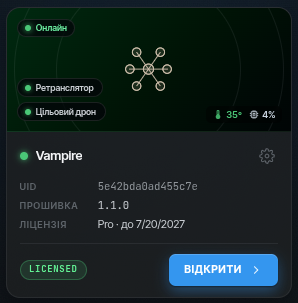
Connecting to the vehicles:
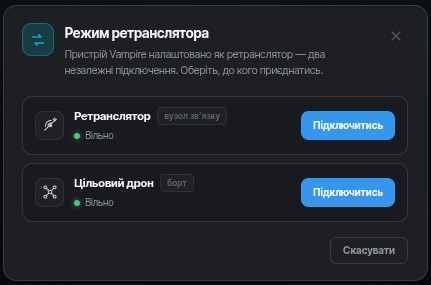
Both the relay and the target drone see all video streams. A vehicle's own streams come directly from it, the others — via the cloud: you see everything, and the Starlink link bitrate does not grow. Streams arriving via the cloud carry a separate badge in the streams panel.
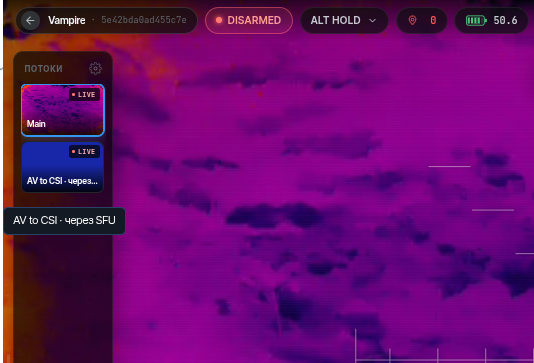
The target drone has no settings of its own — the whole configuration (video, control, streams) is done on the relay.
Tips
- Keep the relay within reliable radio range of the target drone.