
Starlink
If Starlink is installed on board, the device finds the dish itself — once detected, the Starlink icon in the session top bar turns green. Clicking the icon opens the dish status:
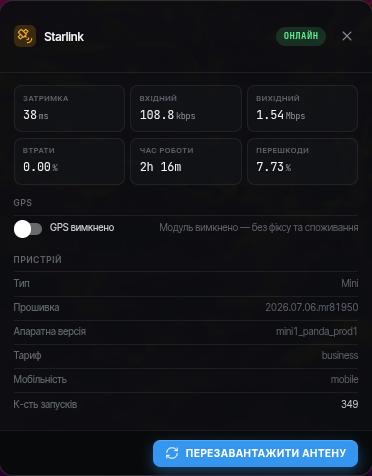
- Latency, speed, loss — current metrics of the dish link.
- Uptime — how long the dish has been running since power-on.
- Obstructed — how much of the sky is blocked; the higher the percentage, the more frequent the link dropouts.
- GPS — the power toggle of the dish GPS module. The dish coordinates are used for the map when there is no position from the flight controller. On startup the device checks the dish and, if GPS is enabled, turns it off.
- Device — dish model, firmware version, service plan.
- Reboot dish — restarts the dish.
When a dish firmware update appears, the app announces its download. Once downloaded, reboot the dish with the Reboot dish button — the update installs automatically. If the link has become unstable, check the Starlink indicator first — the dish may be downloading an update right now.
Rebooting the dish
While Starlink reboots, the connection to the device disappears for a few minutes — this is normal, the device reconnects on its own.